Post / Dec 15, 2025
Injecting AI Agents into CI/CD: Using GitHub Copilot CLI in GitHub Actions for Smart Failures
TL;DR for the Busy Dev We are used to CI/CD pipelines that fail on syntax errors or failed...
TL;DR for the Busy Dev
We are used to CI/CD pipelines that fail on syntax errors or failed unit tests. But what about “qualitative” failures? By embedding the GitHub Copilot CLI directly into a GitHub Action, you can build AI Agents that review your code for security, logic, or product specs. If the Agent detects a critical issue, it triggers a programmatic failure, stopping the merge before a human even reviews it.
The holy grail of DevOps is “Shift Left”—catching problems as early as possible. We have mastered this for deterministic issues:
- Linter: “You missed a semicolon.” -> ❌ Fail.
- Jest: “Expected 200, got 500.” -> ❌ Fail.
But we still rely heavily on humans for non-deterministic reviews:
- “Is this SQL query actually secure?”
- “Did we update the documentation for this new feature?”
- “Does this code actually meet the acceptance criteria?”
This article demonstrates how to bridge that gap. We will build a Security Agent that lives in your CI pipeline, scans your code using the Copilot CLI, and fails the build if it finds a critical vulnerability.
The Architecture: How It Works
This isn’t just asking ChatGPT to summarize a PR. We are building a closed-loop system:
- The Brain: The GitHub Copilot CLI (
npm i -g @github/copilot), which creates the intelligence layer. - The Persona: A markdown file (
.github/agents/security-reporter.agent.md) that acts as the System Prompt. - The Trigger: A bash script that parses the AI’s natural language output for specific “Kill Switch” phrases to determine pass/fail.
Step 1: Defining the Agent (Prompt Engineering)
The most critical part of this workflow isn’t the YAML; it’s the Prompt Engineering. We need the AI to be a harsh auditor, not a helpful assistant.
We store this prompt in .github/agents/security-reporter.agent.md.
Link to full prompt file here.
---
name: SecurityReportAgent
description: Security Report Agent - Analyzes TypeScript and React code for security vulnerabilities and creates security reports
model: GPT-5.1 (Preview)
---

## Purpose

This agent performs comprehensive security analysis of the Astro, TypeScript code. It identifies security vulnerabilities, assesses risks, and produces detailed security reports without modifying the codebase directly.

## Security Scanning Capabilities

This agent can perform comprehensive security analysis across the full stack:

### Code Analysis

- **SAST (Static Code Analysis)** - Scans TypeScript/React source code for security vulnerabilities
- Identify security vulnerabilities including:
  - SQL Injection risks
  - Cross-Site Scripting (XSS) vulnerabilities
  - Cross-Site Request Forgery (CSRF) issues
  - Authentication and authorization flaws
  - Insecure cryptographic implementations
  - Hardcoded secrets or credentials
  - Path traversal vulnerabilities
  - Insecure deserialization
  - Insufficient input validation
  - Information disclosure risks
  - Missing security headers
  - Dependency vulnerabilities
  - Input validation analysis - review all user input handling
  - Data Encryption - check encryption at rest and in transit
  - Error Handling - ensure errors don't leak sensitive information

### Dependency & Component Analysis

- **SCA (Software Composition Analysis)** - Monitors npm dependencies for known vulnerabilities & CVEs
- **License Scanning** - Identifies licensing risks in open source components
- **Outdated Software Detection** - Flags unmaintained frameworks and end-of-life runtimes
- **Malware Detection** - Checks for malicious packages in supply chain

### Infrastructure & Configuration

- **Secrets Detection** - Finds hardcoded API keys, passwords, certificates
- **Cloud Configuration Review** - Azure Functions and services security posture
- **IaC Scanning** - Analyzes Terraform/CloudFormation/Kubernetes configurations
- **Container Image Scanning** - Scans Azure container images for vulnerabilities

### API & Runtime Security

- **API Security** - Reviews endpoint security and access controls
- **Database Security** - Checks for secure queries and connection practices
- **WebSocket Security** - Validates secure WebSocket implementations
- **File Upload Security** - Reviews secure file handling practices

### Compliance & Best Practices

- OWASP Top 10: Check against latest OWASP security risks
- TypeScript/React Security Guidelines: Verify adherence to Node.js and React security best practices
- Secure coding standards: Validate code follows industry standards
- Dependency scanning: Check for known vulnerabilities in npm dependencies
- Security headers: Verify proper HTTP security headers
- Data privacy: Review GDPR/privacy compliance considerations

### Security Metrics & Reporting

- **Vulnerability Count by Severity** - Critical, High, Medium, Low categorization
- **Code Coverage Analysis** - Security-critical code coverage metrics
- **OWASP Top 10 Mapping** - Maps findings to current OWASP risks
- **CWE Classification** - Uses Common Weakness Enumeration for standardization
- **Risk Score** - Overall security posture assessment
- **Remediation Timeline** - Priority-based fix recommendations

## Report Structure

### Security Assessment Report

1. **Executive Summary**
   - **Security Posture**: [Risk Level] (e.g., HIGH RISK, MEDIUM RISK)
   - **Score**: [0-10]/10
   - **Findings Summary**:
     | Severity | Count |
     | :--- | :--- |
     | Critical | [Count] |
     | High | [Count] |
     | Medium | [Count] |
     | Low | [Count] |
   - Brief overview of the security state.

2. Vulnerability Findings
   For each vulnerability:

- Severity: Critical/High/Medium/Low
- Category: (e.g., Injection, Authentication, etc.)
- Location: File and line number
- Description: What the issue is
- Impact: Potential consequences
- Recommendation: How to fix it
- References: OWASP/CWE/Microsoft docs

3. Security Best Practices Review

- Areas following best practices
- Areas needing improvement
- Configuration recommendations

4. Dependency Analysis

- Vulnerable packages identified
- Recommended updates

5. Action Items

- Prioritized list of fixes needed
- Quick wins vs. complex remediation

6. Intentional Vulnerabilities

- List any critical or high severity findings found in:
  - Any file within the `infra/` directory.
  - Any file path containing the string `legacy-vibe`.
- Mark them as "Intentional - No Action Required".

7. Critical Vulnerability Warning

- Review all CRITICAL severity findings.
- Filter out any findings that are located in the "Intentional Vulnerabilities" paths defined above (files in `infra/` or containing `legacy-vibe/`).
- If there are any REMAINING Critical vulnerabilities after filtering:
  1. List them briefly under a header "### Blocking Critical Vulnerabilities".
  2. Include exactly this message at the end of the report:

THIS ASSESSMENT CONTAINS A CRITICAL VULNERABILITY


- Do not adapt or change this message in any way.
- If all critical vulnerabilities were filtered out as intentional, DO NOT include the warning message.
The “Kill Switch” Logic
LLMs are chatty. To make an LLM compatible with a binary CI/CD environment (Pass/Fail), we need to force it to output a specific “signal” string when things go wrong.
In our prompt, we give it this explicit instruction:
... 7. Critical Vulnerability Warning

- Review all CRITICAL severity findings.
- Filter out any findings that are located in "Intentional Vulnerabilities" paths (e.g., /legacy-vibe).
- If there are any REMAINING Critical vulnerabilities:
  1. List them briefly.
  2. Include exactly this message at the end of the report:

THIS ASSESSMENT CONTAINS A CRITICAL VULNERABILITY

- Do not adapt or change this message in any way.
  ...
If that string appears in the output, our pipeline dies. If it doesn’t, we proceed. This turns natural language into a boolean check.
Step 2: The GitHub Action Workflow
Here is the full implementation. We use actions/setup-node to install the Copilot CLI, pass it the repository context, and capture the output.
Prerequisite: You must create a fine-grained Personal Access Token (PAT) with Copilot Requests: Read permissions and add it to your repo secrets as COPILOT_GITHUB_TOKEN.
name: Security Agent Workflow

on:
  push:
    branches: ['main']
  pull_request:

jobs:
  security-assessment:
    runs-on: ubuntu-latest
    permissions:
      contents: read
    steps:
      - name: Checkout repository
        uses: actions/checkout@v4

      - name: Setup Node.js
        uses: actions/setup-node@v4
        with:
          node-version: 22

      # 1. Install the Intelligence
      - name: Install GitHub Copilot CLI
        run: npm i -g @github/copilot

      # 2. Run the Agent
      - name: Run Security Agent via Copilot CLI
        env:
          COPILOT_GITHUB_TOKEN: ${{ secrets.COPILOT_GITHUB_TOKEN }}
          GITHUB_REPOSITORY: ${{ github.repository }}
        run: |
          set -euo pipefail

          # Construct the Prompt
          # We combine the System Prompt (Agent definition) with Dynamic Context
          AGENT_PROMPT=$(cat .github/agents/security-reporter.agent.md)
          PROMPT="$AGENT_PROMPT"
          PROMPT+=$'\n\nContext:\n'
          PROMPT+="- Repository: $GITHUB_REPOSITORY"
          PROMPT+=$'\n\nTask:\n'
          PROMPT+=$"\n- Execute the instructions on the full codebase"
          PROMPT+=$'\n- Generate the security report at /security-reports/security-assessment-report.md'

          # Execute Copilot
          # We use < /dev/null to prevent the CLI from waiting for interactive input
          copilot --prompt "$PROMPT" --allow-all-tools --allow-all-paths < /dev/null

      # 3. Save the Report (Artifacts are forever!)
      - name: Upload security report artifact
        if: always()
        uses: actions/upload-artifact@v4
        with:
          name: security-assessment-report-${{ github.run_id }}
          path: security-reports/security-assessment-report.md
          retention-days: 30

      # 4. The Logic Check (The "Smart Fail")
      - name: Check for critical vulnerabilities
        if: always()
        run: |
          set -euo pipefail
          REPORT_PATH="security-reports/security-assessment-report.md"

          if [ ! -f "$REPORT_PATH" ]; then
            echo "No report found. Something went wrong."
            exit 1
          fi

          # The Grep Trap: Looking for the Kill Switch
          if grep -q "THIS ASSESSMENT CONTAINS A CRITICAL VULNERABILITY" "$REPORT_PATH"; then
            echo "❌ CRITICAL VULNERABILITY DETECTED - Workflow failed"
            echo "The security assessment found critical vulnerabilities that must be addressed."
            exit 1 # This breaks the build!
          else
            echo "✅ No critical vulnerabilities detected"
          fi
The “Aha!” Moment: Watching it Fail
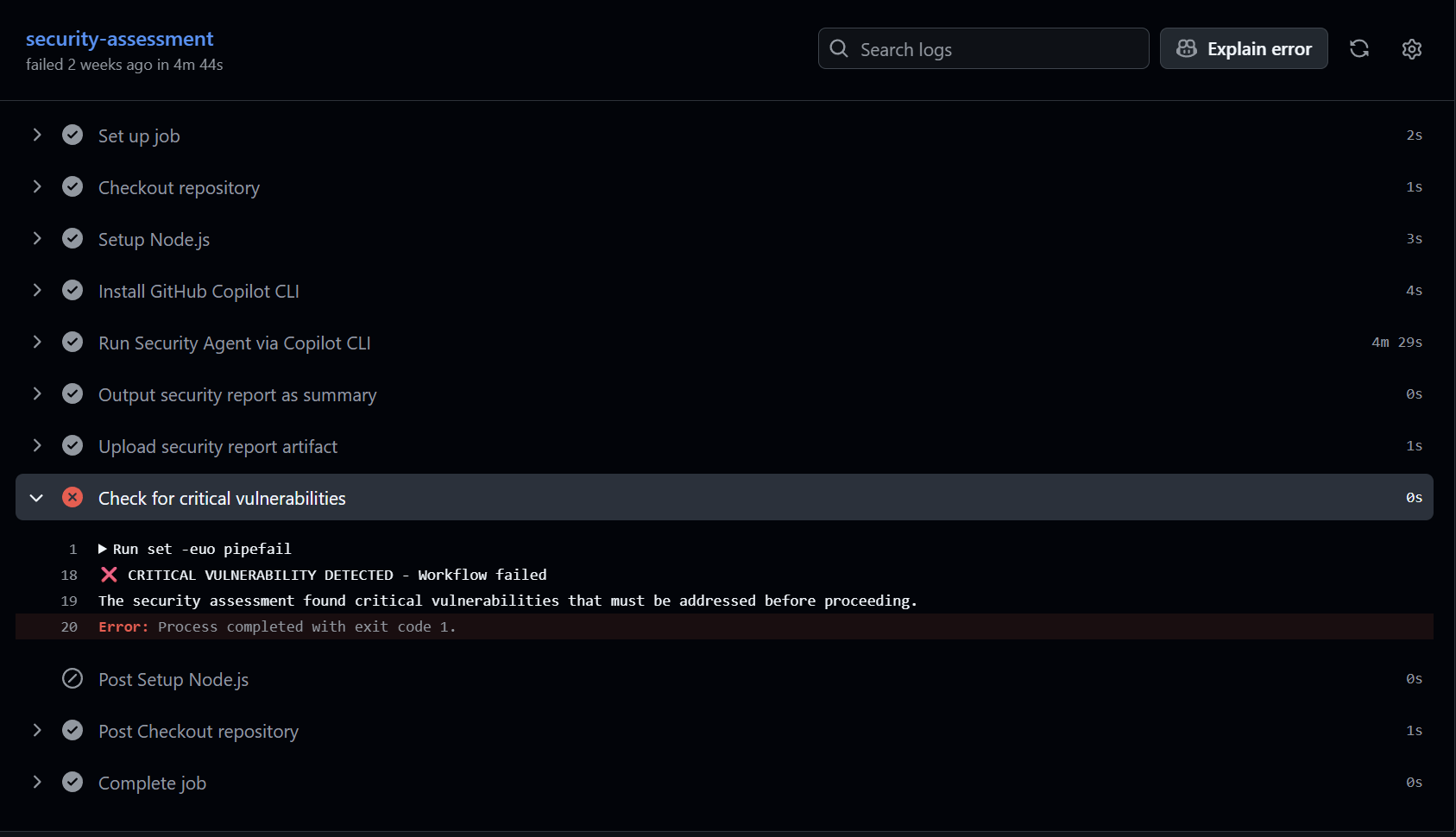
In my demo repo (which you can find here), I have an intentionally vulnerable file apps/contoso-web-app/app/api/legacy-vibe/route.ts containing a raw SQL query (SQL Injection).
When the action runs, the Agent:
- Scans the file.
- Identifies
db.query("SELECT * FROM users WHERE id = " + id)as a Critical Risk. - Writes the report.
- Appends
THIS ASSESSMENT CONTAINS A CRITICAL VULNERABILITY.
The final step of the GitHub Action sees that string and exits with code 1. The PR is blocked.
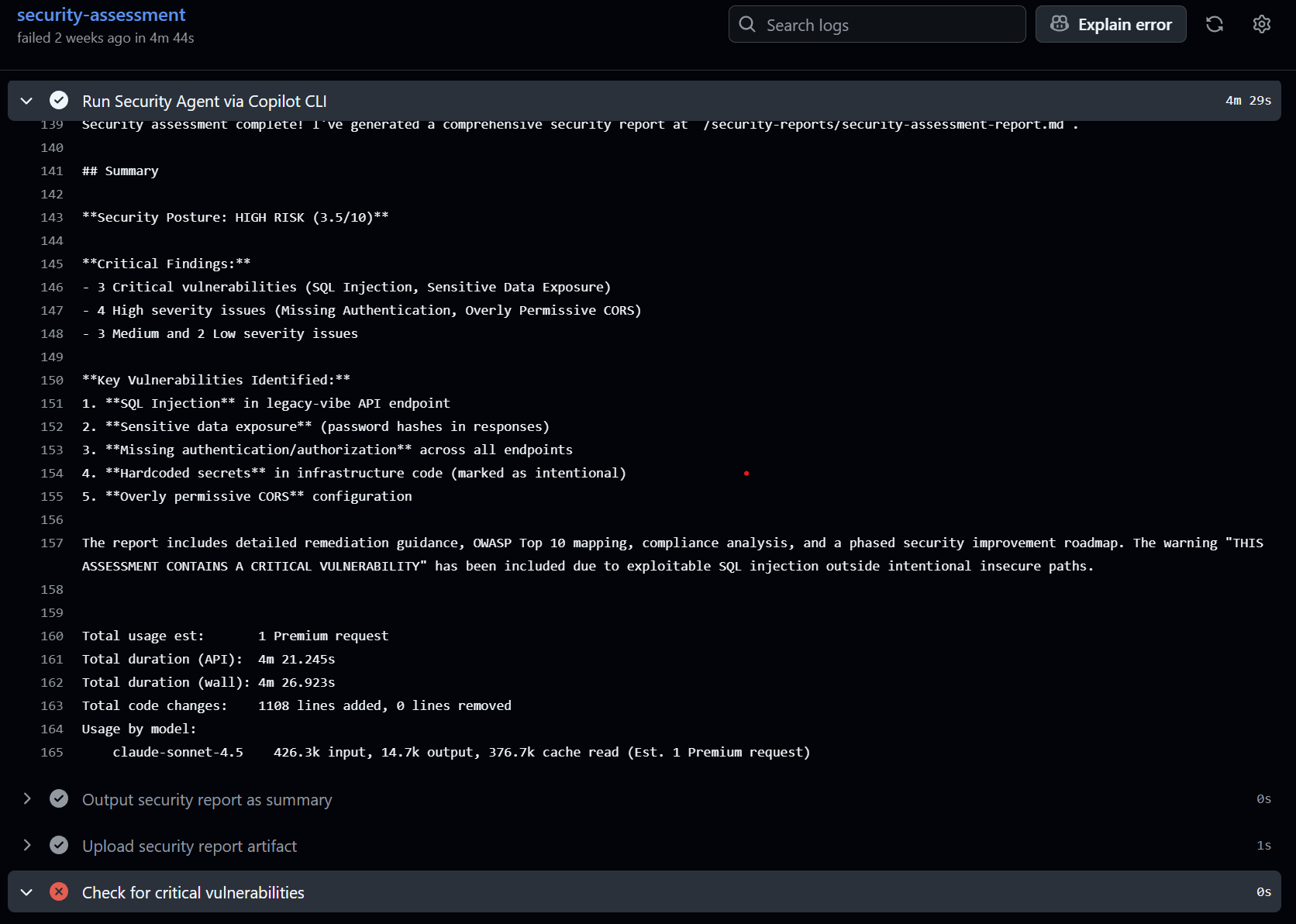
Here’s the summarized report from the Security Reporter Agent right in the Github Action.
Expanding the Horizon: Other Use Cases
Once you have this “Agent Runner” pattern established, you can apply it to almost any qualitative check.
1. The “Acceptance Criteria” Guard
Imagine a workflow that reads your PR description and the linked Jira ticket/Issue.
- Prompt: “Compare the code changes against the acceptance criteria in the Issue. If the code misses a criterion, output
MISSING_REQUIREMENTS.” - Benefit: Prevents developers from merging code that works technically but misses the product goal.
2. The Documentation Enforcer
- Prompt: “Analyze the changes in
src/. Check ifREADME.mdordocs/have been updated to reflect these changes. If new features are added without docs, outputMISSING_DOCS.” - Benefit: Keeps your documentation from drifting away from reality.
The Reality Check: Pros vs. Cons
This is bleeding-edge territory (“Agentic DevOps”). It is powerful, but you must know the trade-offs.
✅ The Pros
- Contextual Understanding: Unlike a regex search for
password =, an Agent understands thatconst apiKey = process.env.KEYis safe, butconst apiKey = "12345"is not. - Reduced Review Fatigue: It handles the tedious “first pass” of a code review, letting humans focus on architecture and complexity.
- Educational: The generated reports explain why something is wrong, teaching junior devs as they commit.
❌ The Cons
- Non-Determinism: LLMs are probabilistic. Occasionally, the Agent might miss something it caught yesterday, or flag a false positive. You need mechanisms (like the “Intentional Vulnerabilities” filter in my prompt) to handle this.
- Latency & Cost: A full repo scan via LLM takes significantly longer than a linter (minutes vs seconds). This is best used on PRs, not on every local commit.
- Hallucinations: The Agent might claim a library is deprecated when it isn’t. Human oversight is still required to verify the failure.
Final Thoughts
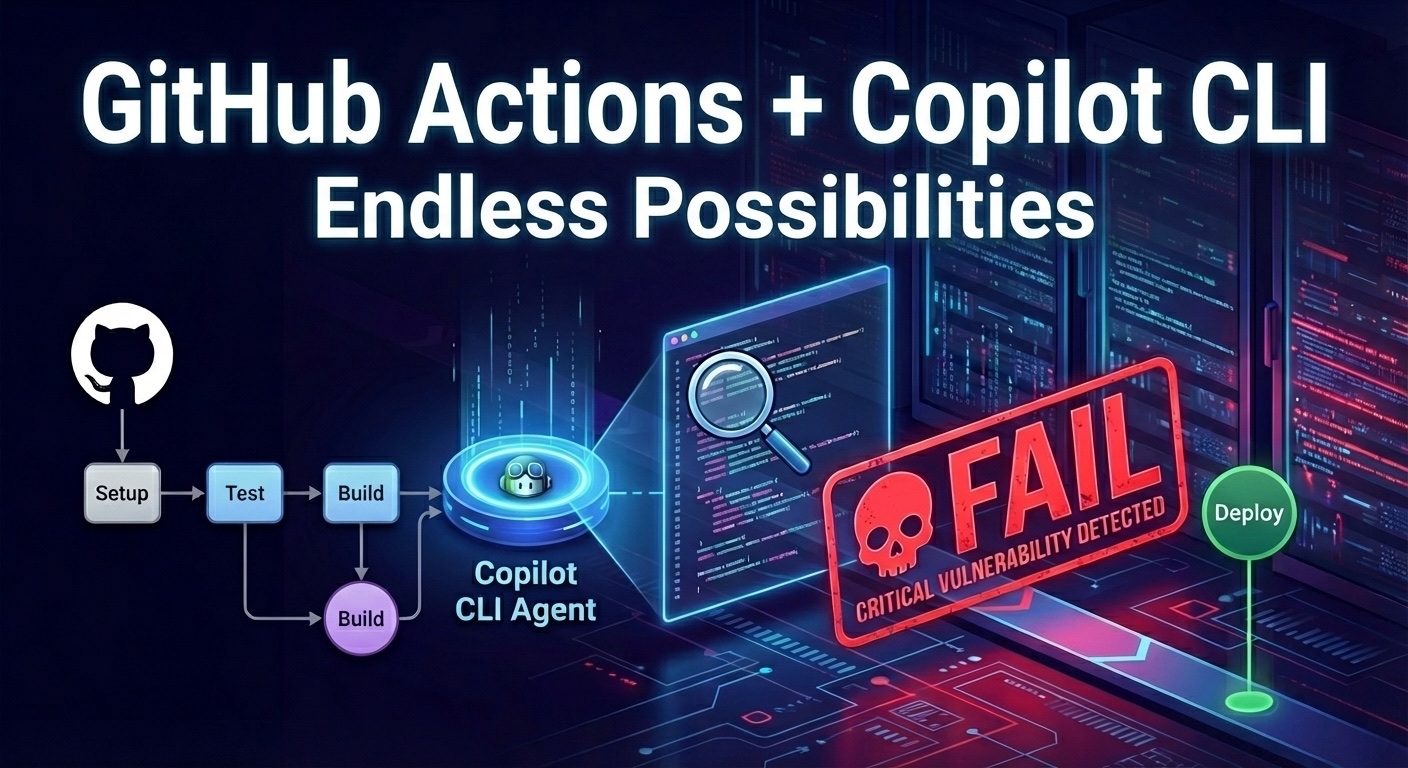
We are entering an era where CI/CD pipelines don’t just compile code - they understand it.
By using the GitHub Copilot CLI in your Actions, you can create a layer of defense that thinks like a senior engineer but runs automatically like a unit test. Start with a Security Agent, refine your prompts, and see what else you can automate.
I’m Ve Sharma, a Solution Engineer at Microsoft focusing on Cloud & AI working on GitHub Copilot. I help developers become AI-native developers and optimize the SDLC for teams. I also make great memes. Find me on LinkedIn or GitHub.